

Orders in 1:1 chats
Admins who reply to customers in Meta Business Suite (the inbox of your Facebook page and Instagram) can type an order command in the customer's chat. Once the details are complete, the bot creates the order in GoSaaS for that customer and replies in the same chat with the order number, total and payment link
Before you start, set up the command as described in Setting up chat order commands:
The Facebook page or Instagram account your admins reply from is under แชทส่วนตัว (Private chats) in the command, and the command is on
The command's รูปแบบข้อความ (Message format) includes the หมายเลขผู้ใช้ (User number) chip to name the seller
The seller has a GoSaaS user number such as USR27 (see the หมายเลขผู้ใช้ (User number) column in Managing shop users)
Creating an order from the page inbox
Before using it for real, open the command's edit page and click the กล่องเพจ (Page inbox) tab in the try panel on the right. Paste a message the way an admin would type it and press Enter to see what the customer will get
This panel does not create a real order and sends nothing to anyone
The sub-district, total, order number, payment link and customer name in the panel are examples
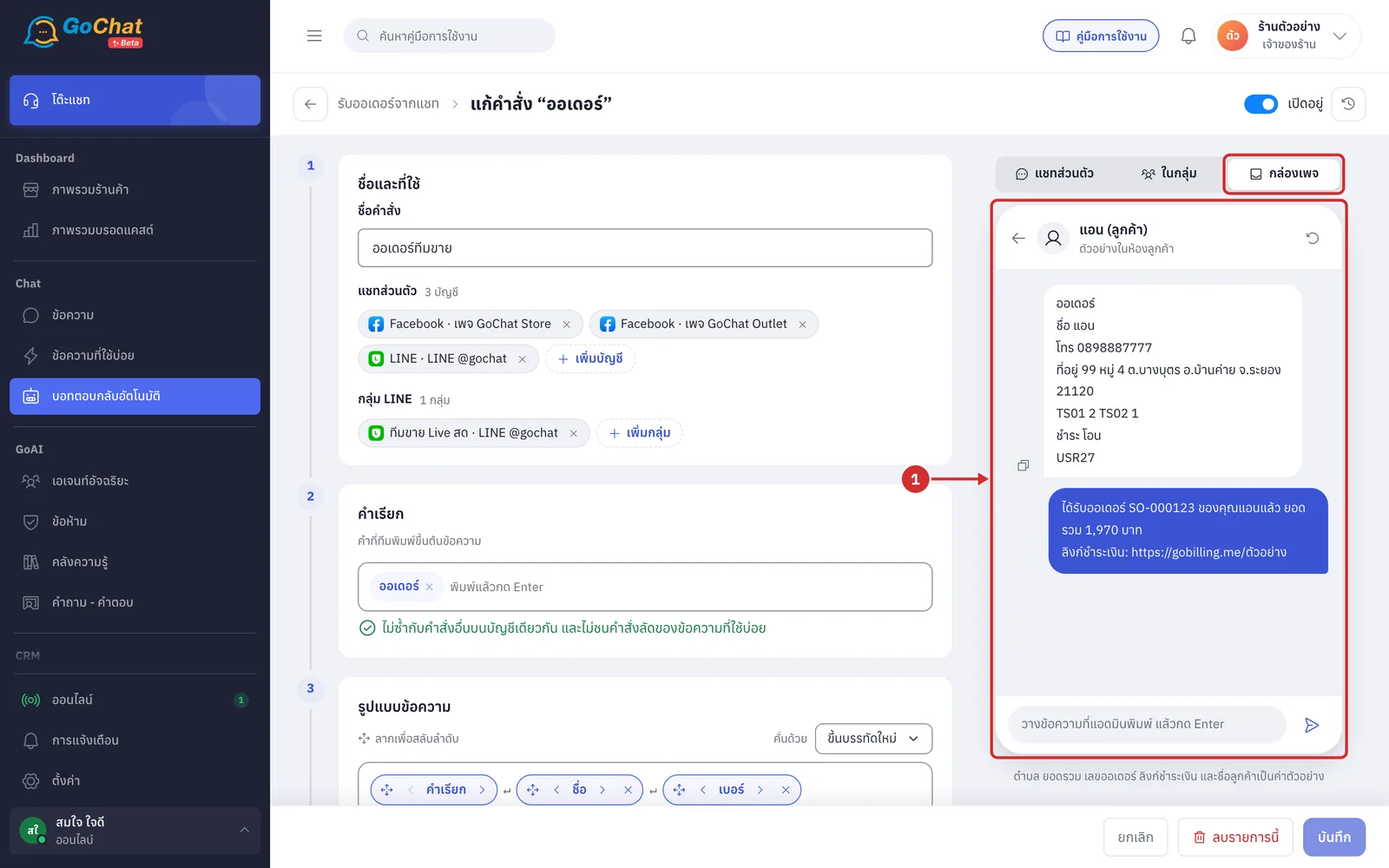
In Meta Business Suite, open the customer's chat and type the whole command in one message: start with a trigger word such as ออเดอร์, then the details in the command's format and the seller's user number such as USR27, then send it
This message is sent to the customer like any other message, so the customer sees the command you typed
Messages that do not start with a trigger word are ignored by the bot, so you can keep chatting with the customer as usual
You can leave out the user number only in chats already linked to a seller (see Orders in LINE groups and from the sales team)
When the details are complete, the bot creates the order in GoSaaS straight away, with no summary to confirm, and replies to the customer in that chat with the command's ข้อความยืนยัน (Confirmation message) followed by a ลิงก์ชำระเงิน: (Payment link) line
The default confirmation is “ได้รับออเดอร์ … ของคุณ…แล้ว ยอดรวม … บาท” (Received order … for …, total … baht); change it in the command's ตอบกลับเมื่อรับออเดอร์ (Replies) step
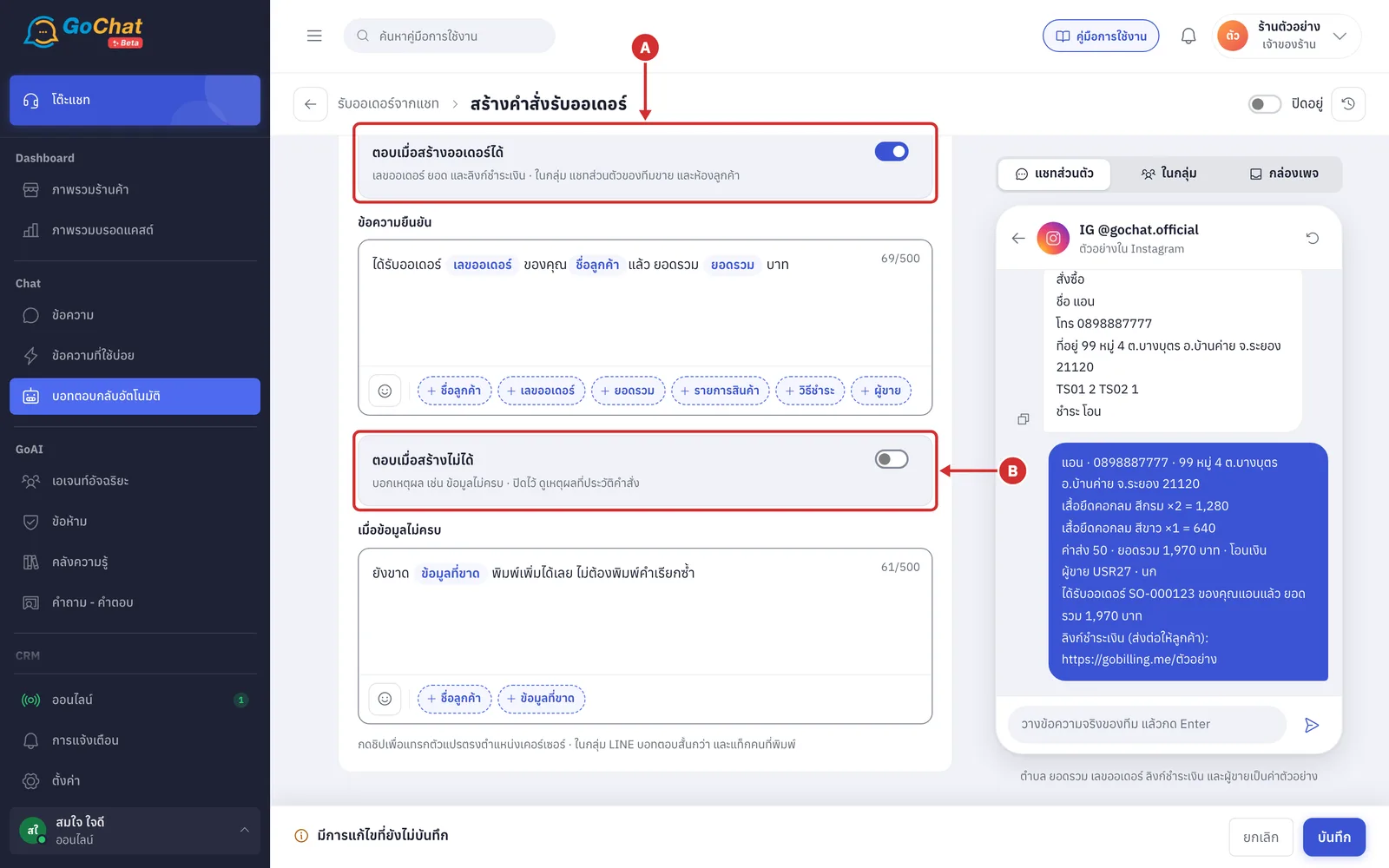
A ตอบเมื่อสร้างออเดอร์ได้ (Reply when the order is created): turn it off and the bot still creates the order but does not reply in the chat
The customer in that chat is saved as a customer with the phone number from the order
If the order cannot be created, for example because details are missing or there is no user number, the bot does not reply in the chat (default). See why in order command history, which shows the status สร้างไม่ได้ (Not created) and the กล่องข้อความเพจ (Page inbox) label
B ตอบเมื่อสร้างไม่ได้ (Reply when the order cannot be created): turn it on and the bot replies ยังสร้างออเดอร์ไม่ได้ — … (Cannot create the order yet — …) with the reason, such as missing phone number and address (the customer sees this too)
The bot does not add your next message to the old command; fix it and type the whole command again
About ordering from the page inbox
Works with Facebook pages and Instagram only. LINE OA is not supported, because LINE does not send messages that admins type in LINE OA Manager to the system (sales staff on LINE order through a LINE group or as private chat sellers instead)
The bot can reply within 24 hours of the customer's last message, as required by Meta
If another app is handling that chat, the order is still created but the bot cannot send its reply; the command history shows ส่งไม่ถึงแชท (Not delivered to chat)
If the bot says ระบบร้านขัดข้องชั่วคราว ตรวจใน GoSaaS ว่ามีออเดอร์นี้หรือยัง ก่อนพิมพ์คำสั่งใหม่ (The shop system is temporarily unavailable; check GoSaaS for this order before typing the command again), check GoSaaS first so you do not create a duplicate order